

For online stores run by a small team, selling from their own site or from Instagram
Your store's WhatsApp, Instagram and Messenger chats, answered by the whole team in one place
Connect Wasl gathers your store's WhatsApp numbers and its social media (Instagram DMs and Facebook Messenger) into one inbox your team shares. Comments asking for the price are answered by a comment automation, whose DM with the product link lands in that inbox, after-sales can run on a number of its own, and staff reply from their phones. Standard is SAR 349 a month for one WhatsApp number, with as many team members as the store needs.
Example: how an online clothing store with two salespeople and a customer care line works with Connect Wasl
Why do customer messages get lost at an online store?
Because they come in from several apps at once, while the same few people pack parcels and answer. Here are six problems online stores run into, each with the way Connect Wasl handles it.
Customers write on WhatsApp, Instagram and Messenger, each in its own app
One customer messages the store's WhatsApp, another sends an Instagram DM, a third comments under a post or writes on your Facebook Page, and someone has to check every app in turn. On Standard, Instagram DMs and Facebook Messenger arrive in the same inbox as WhatsApp at no extra cost, each chat marked with where it came in, and comments are answered by a comment automation whose DM opens a chat there.
"Price?" under every single post
A new item goes up and the comments fill with the same one-word question. A comment automation watches the posts you choose for a word such as "price", answers in public that the details are in a DM, and sends one private message per comment with a button to the product page, as Meta allows. Instagram DM keyword replies can send the same product link when the question comes by DM.
Two or three people sharing one phone, or answering from their own numbers
When the store's chats live on one handset, whoever holds it answers, and chats on a personal number leave with the person. Put the store's number in a shared inbox, give each chat to one named person on the team, and let everyone reply from the Connect Wasl phone app when they are away from the desk.
Sales questions and after-sales requests mixed in one list
A question about a colour sits between a late delivery and an exchange, and the people selling end up handling returns. Add a Customer care number to the same workspace (on Standard each extra number is billed per number): every chat shows the number it reached, after-sales chats go to the customer care team, and tags such as "Exchange" keep them easy to find.
White Friday, Ramadan and Eid bring the same questions over and over
In a busy season the team spends the day typing delivery times and the exchange policy again and again. A WhatsApp automation on the "New contact" trigger sends a menu of buttons: delivery times, exchanges and returns, and payment options each send a message with a link to the right page on your store, and "Talk to the team" lets a person know the customer wants them.
Customers who asked about a restock never hear back
Someone asks for a size that has sold out, and when it returns nobody remembers who wanted it. Tag those chats "Asked about a restock", then send a broadcast with an approved template to the contacts with that tag who opted in to your messages, with a button that opens the product page. The same works when a new collection opens.
What does a day of store messages look like with Connect Wasl?
An example store, Demo Store, selling clothing and accessories, with a Sales number, a Customer care number and an Instagram account, and a team of Sales 1, Sales 2 and Customer care. Every screen is redrawn from the app with demo data, and the phone numbers on it are masked.
Two WhatsApp numbers and Instagram, side by side
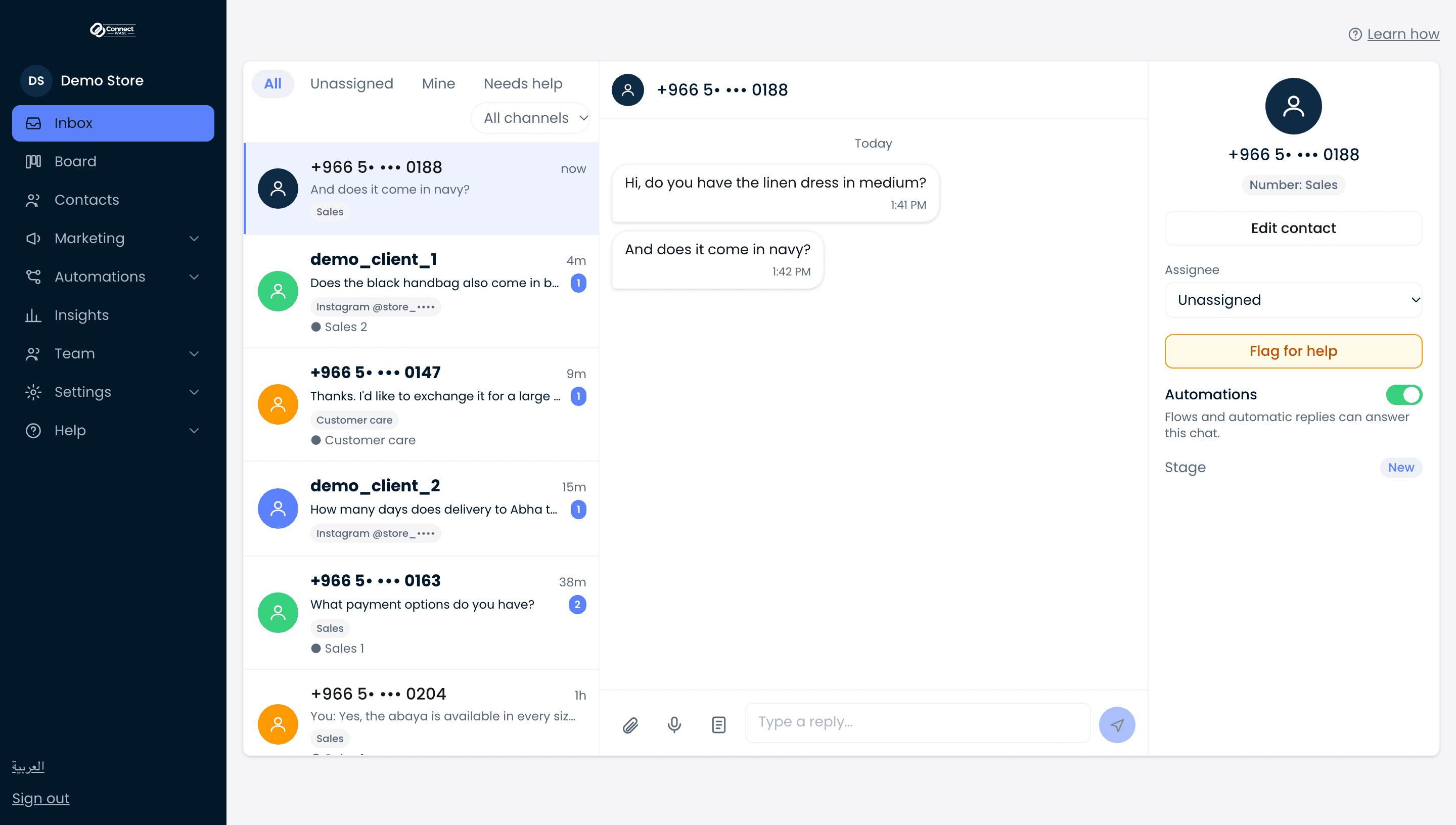
Chats from the Sales number, the Customer care number and the store's Instagram account land in one list, each marked with where it arrived. On Instagram, one customer asks whether the black handbag also comes in beige and another how many days delivery takes to Abha; on WhatsApp, others ask about payment options, an abaya in every size and an exchange. Two chats are still unassigned, including the open one, where a customer asks whether the linen dress comes in medium, and in navy.
Example screen: demo store data, numbers masked A comment that says "price" gets a DM
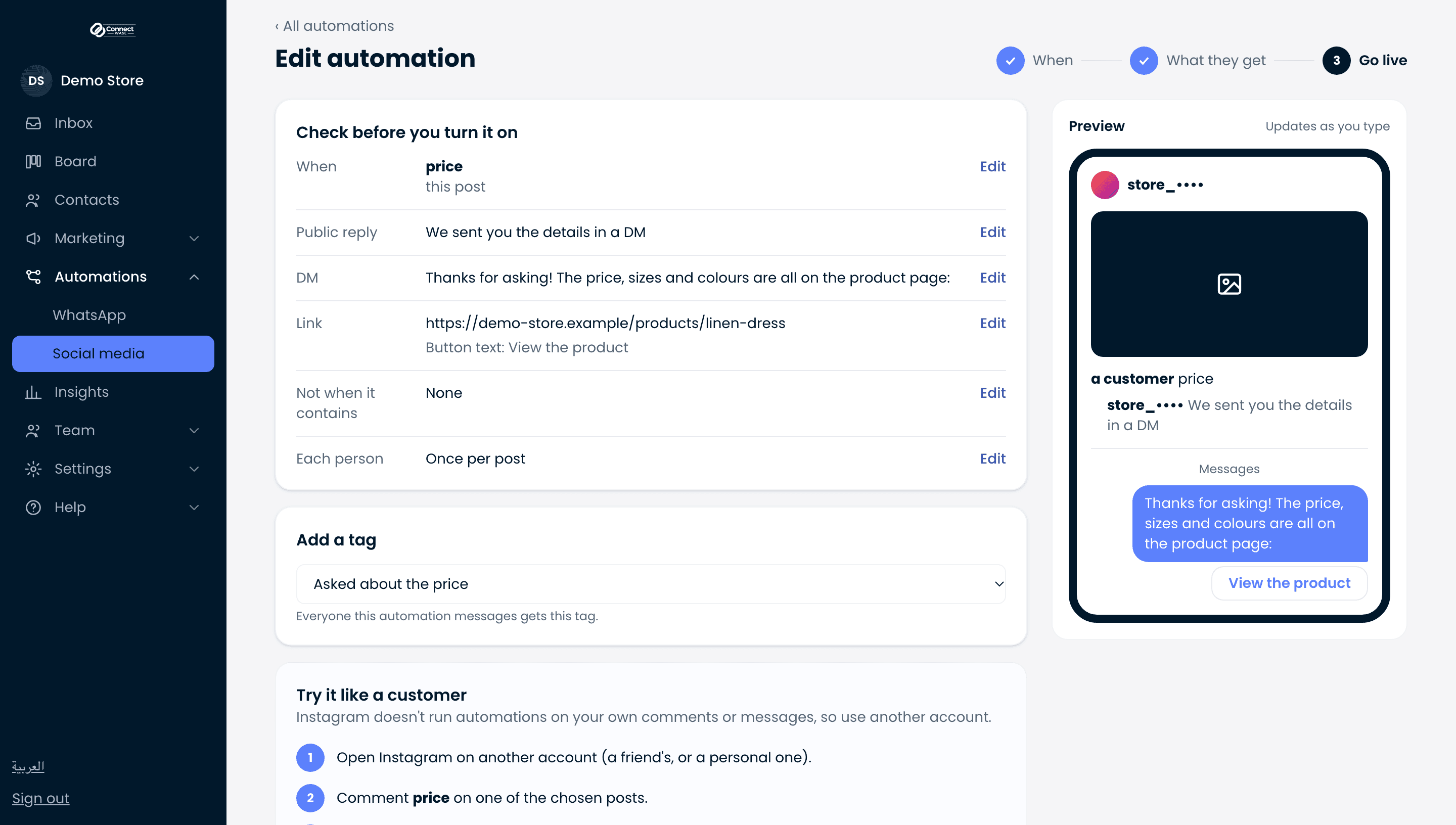
The store set a comment automation on one Instagram post for the word "price". Under the comment it writes "We sent you the details in a DM", and in private it thanks the customer and points to the product page, where the price, sizes and colours are listed, with a "View the product" button. Each person gets it once per post and is tagged "Asked about the price".
Example screen: demo store data, numbers masked A welcome menu for the busy season
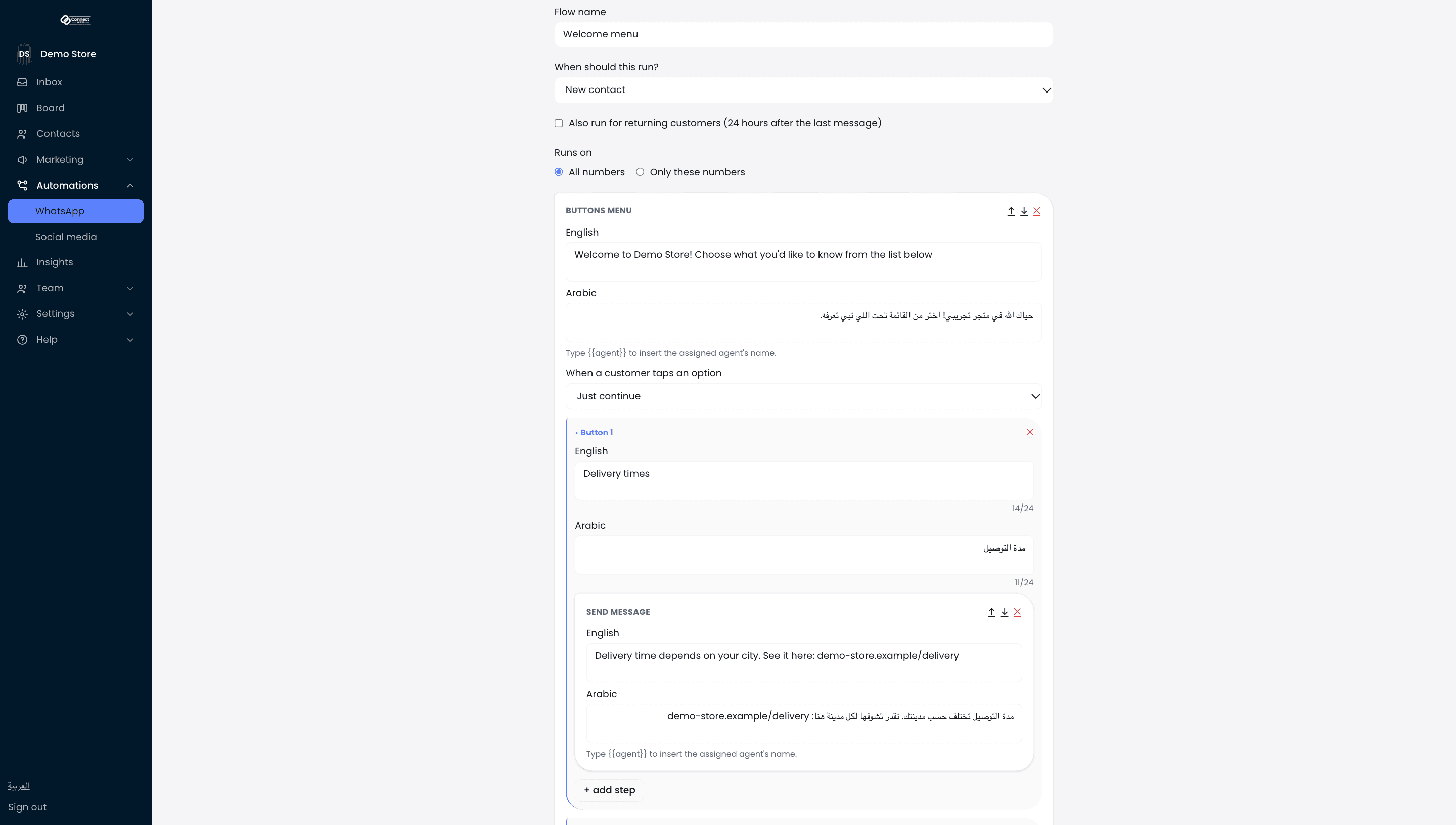
The store's WhatsApp automation, "Welcome menu", runs on "New contact", on all numbers, and opens with a buttons menu that asks the customer to choose. "Delivery times" sends a message with the page that lists delivery by city; further down the same menu, "Exchanges and returns" sends the policy link, "Payment options" sends its own link and "Talk to the team" alerts a person.
Example screen: demo store data, numbers masked An exchange, handled on the Customer care number
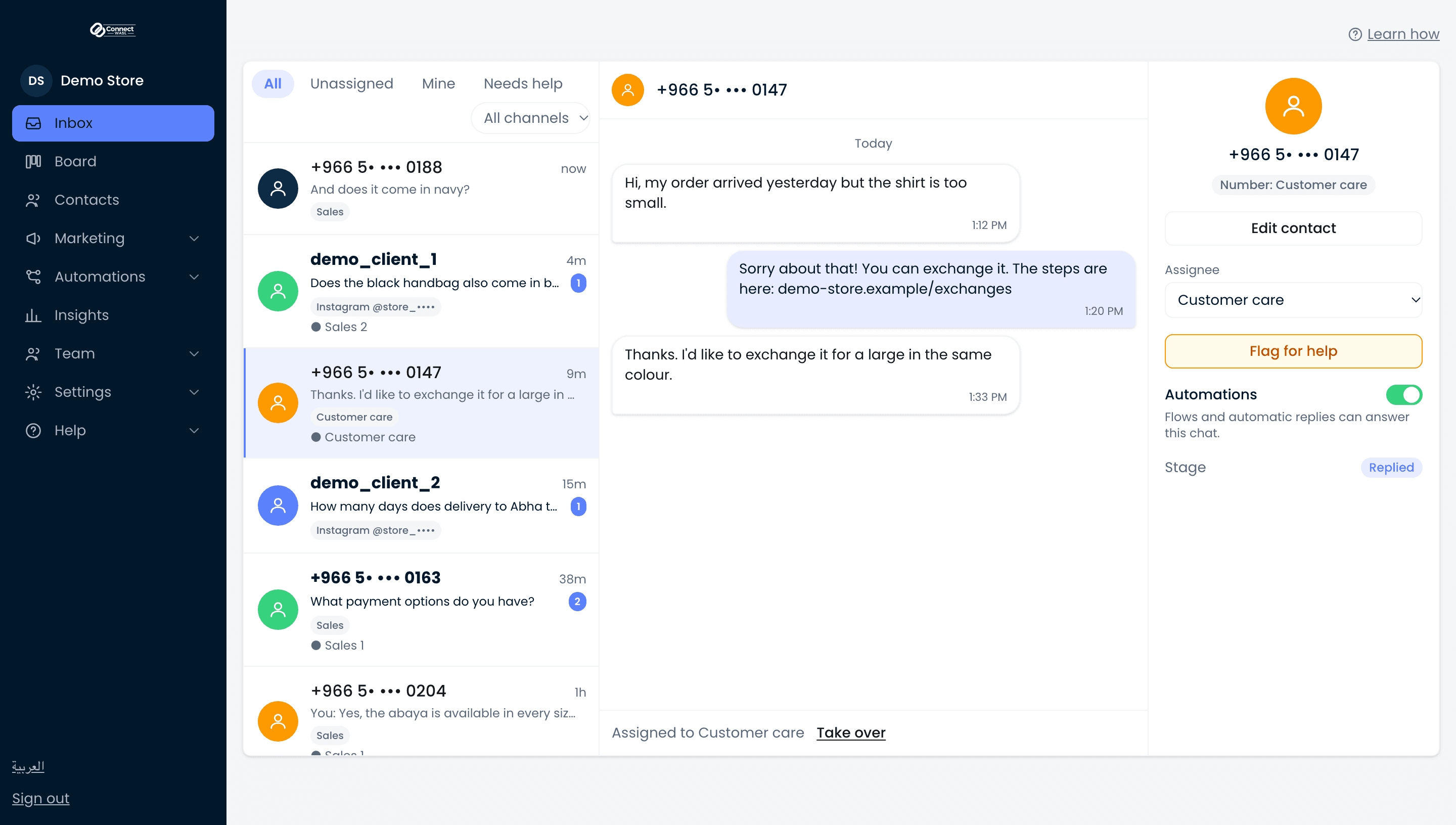
A customer writes to the Customer care number that the shirt came too small. Customer care, who has the chat, replies with a link to the exchange steps, and the customer asks for a large in the same colour. The owner sees the chat marked "Assigned to Customer care", with Take over beside it if she needs to step in.
Example screen: demo store data, numbers masked Sales 1 settles a size question from the phone
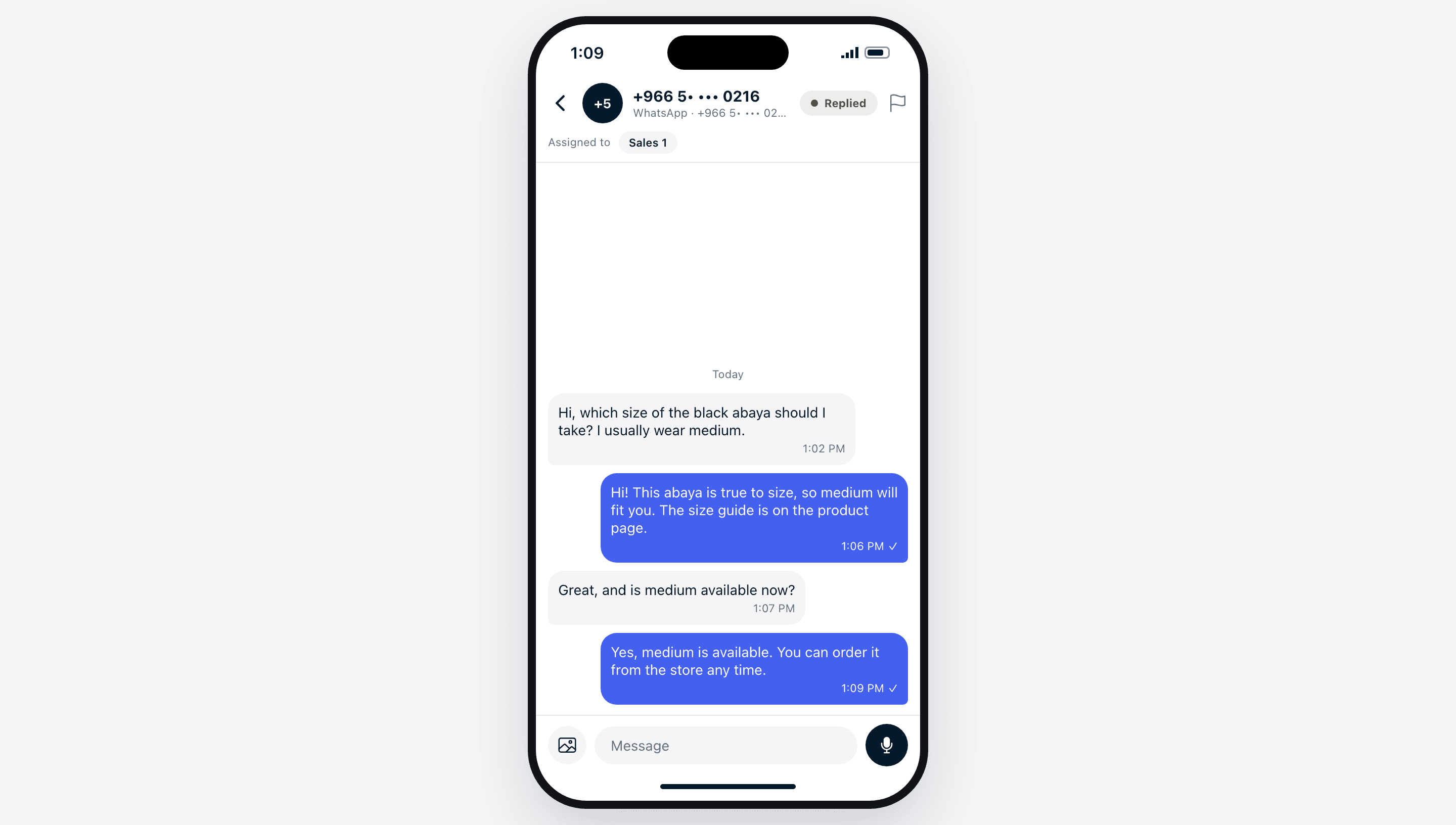
A customer asks which size of the black abaya to choose, since she usually wears medium. Sales 1 answers from the Connect Wasl phone app: the abaya is true to size, medium will fit, and the size guide is on the product page. Medium is in stock, and she can get it from the store whenever she likes.
Example screen: demo store data, numbers masked Back in stock, for the people who asked
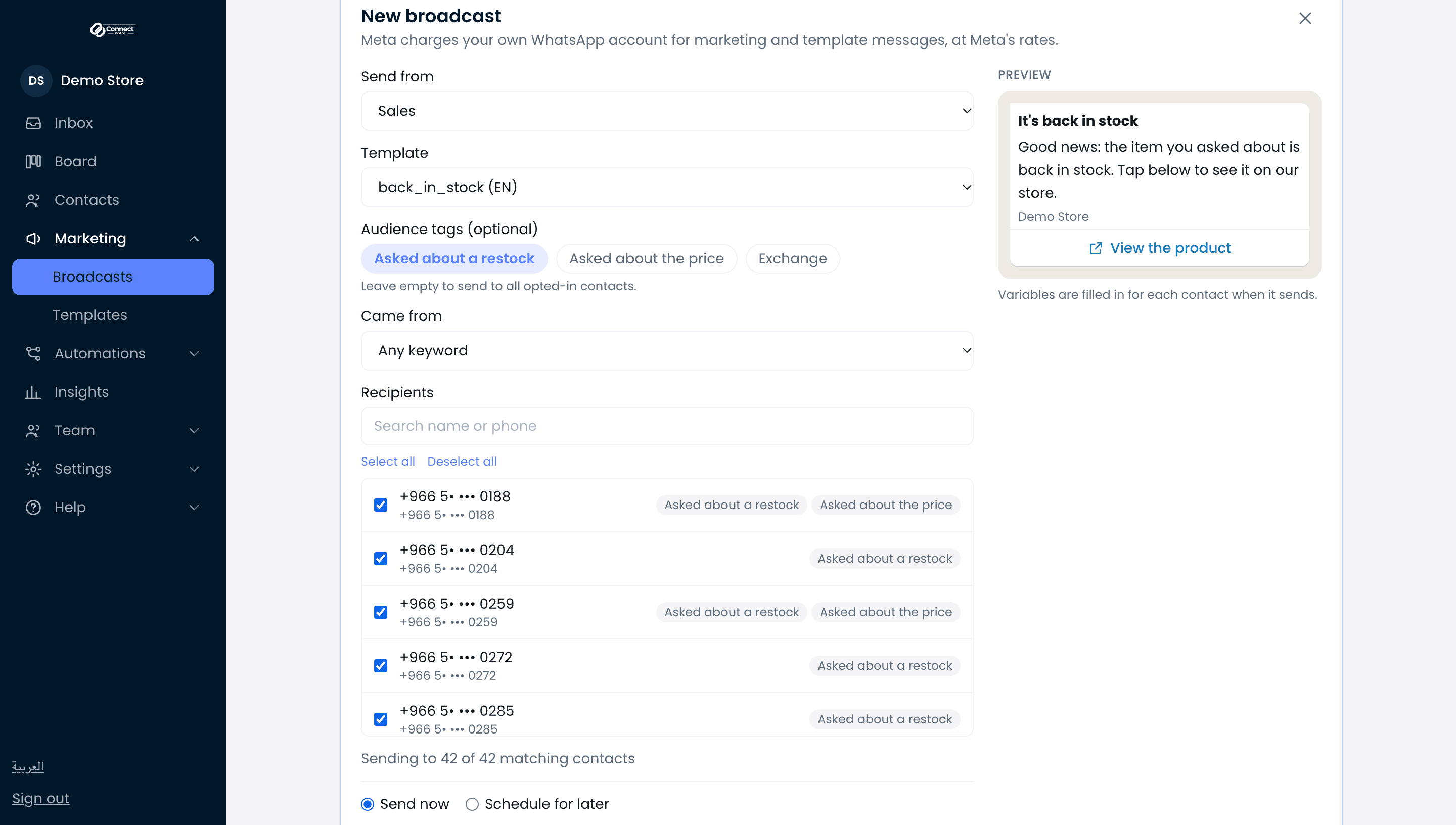
When the item returns, the owner sends the approved "back_in_stock" template from the Sales number to the 42 contacts tagged "Asked about a restock". The message says the item they asked about is back, with a "View the product" button, and carries no price. When a customer answers, the reply opens a normal chat in the inbox for the team.
Example screen: demo store data, numbers masked
What does the store's team get?
Which plan fits an online store?
Standard: SAR 349 a month for one WhatsApp number, with Instagram and Facebook Messenger in the same shared inbox and unlimited team members. Automation flows, comment automation and broadcasts are included. A Customer care number joins the same workspace and is billed per number. Book a call and we connect your store's number and Instagram with you, or start the free trial on your own.
A bigger store running several numbers or teams? Enterprise includes up to 10 WhatsApp numbers, at SAR 1,499 a month. Compare Enterprise
Questions online stores ask before they start
Can we answer WhatsApp, Instagram and Messenger messages in one place?
Yes. Connect the store's WhatsApp number, its Instagram account and its Facebook Page, and every chat arrives in one Connect Wasl inbox, marked with its channel. Your team assigns and answers them from the same screen, and on Standard Instagram and Messenger cost nothing extra.
Can "price?" comments get an automatic DM?
Yes, on Instagram. A comment automation replies in public and sends one private DM per comment, as Meta allows, with a link to the product page. You choose the posts and the word, and you can limit each person to once per post.
Can after-sales have its own number?
Yes. Add a Customer care number to the same workspace: each chat shows the number it reached, and you assign after-sales chats to the people who handle them. On Standard that second number is billed per number; Enterprise includes up to 10.
Does Connect Wasl send order updates or connect to my store?
No. Your store platform sends order updates. Connect Wasl is where your team handles the conversations: customers' questions, exchanges and requests on WhatsApp and social media.
Can we tell customers when an item is back in stock?
Yes, the customers who opted in. Send a broadcast with a Meta-approved template to the contacts who agreed to receive your messages, for example everyone tagged "Asked about a restock". Meta bills those template messages to your own WhatsApp account at its own rates.
Can staff answer customers from their phone?
Yes. The team uses the Connect Wasl app for iPhone and Android to open the chats assigned to them and reply on the move. Every reply also shows in the shared inbox, so the rest of the team sees what the customer was told.
Are AI replies included in Standard, or a paid add-on?
It's a paid add-on on Standard. Turn AI replies on when you want written answers to common questions in Arabic; the welcome menu, comment automation and Instagram keyword replies work without them.
Answer your store's customers, from WhatsApp to Instagram, in one inbox
Book a short call and we set the inbox up together, or start the free trial today and connect your channels yourself.